Upload. List. Win.51 giveaway winners.
FEATURES

The eight things other card apps don’t do.

A helper that does the work for you, a morning report on your cards, a path from phone photo to live eBay listing, and a card show mode that works with no signal — plus the grading, cleanup, and profit tools that keep you in the black. Everything below is live today, with the plan that unlocks it.

Download on the App StoreTake the same vault with you on iPhone and iPad.
01 · ROCKETVAULT AGENT

Your helper. Ask it anything, then approve what it does.

Ask about any card, sale, or listing—then turn the answer into an action. RocketVault previews the exact change, fees, and payout before anything runs.
SEE EVERYTHING INCLUDED

The RocketVault Agent is a chat helper that knows your cards. Ask about your collection, your listings, your sales, your profit, or what's worth flipping — every number comes from your own data, never a guess. Ask which cards to list right now and it checks the latest news and recent sales to tell you what to put up today, and why — each pick linked to a real source. Then put it to work: edit cards, write and post eBay listings, end and re-post, drop prices with a floor, build and post bundles, manage your watchlist, even connect eBay. Before anything happens it shows you exactly what it'll do — the change on an edit, the fees and payout on a listing, the full effect of a price drop — and nothing runs until you click Approve. On a computer, hit Cmd-K to open it on any page.

WHY THIS IS DIFFERENT
Card Dealer Pro has no chat helper; Slabfy's gives buy/pass calls but doesn't advertise doing the work for you across listings, bundles, and pricing — with your approval.
RocketVault AgentEvery plan — Free: 10 a month · Collector: 50 · Seller: 200 · Pro+: unlimited
What it can doEdit cards, post listings, build bundles, drop prices, manage your watchlist, connect eBay
You approve firstIt shows the change, the fees, and the payout before anything runs
Open it anywhereCmd-K side panel on a computer; full page on your phone
Shows its workEvery answer shows where the numbers came from
Your data onlyLocked to your account — it never sees anyone else's cards
02 · DAILY BRIEFING · COMMAND CENTER

Open the app to a daily read on your cards, the news, and the market.

Your collection wakes up organized: opportunities, warnings, player news, nearby shows, and trade matches are already tied to the cards they affect.
SEE EVERYTHING INCLUDED

Every morning RocketVault writes you a short report and puts it on your home screen — what to reprice, what to list, the rookies worth grading, your sales so far, and news about the players you own, with every card linked so you can act in a tap. Ask for more listing, grading, or lot ideas without waiting for tomorrow. It also finds next-week card shows near you, prepares pack-list recommendations for shows you've saved, and surfaces public trade listings that match your want list with price and fairness guidance. The news and market facts are looked up live as it's written, and every outside fact links to a source you can check. A weekly email sums it up and links you back.

WHY THIS IS DIFFERENT
Other card tools open on a dashboard you have to dig through — neither Card Dealer Pro nor Slabfy advertises a daily, source-backed report written from your own cards.
Daily reportCollector and up — written overnight, loads instantly
Player news → your cardsNews, injuries, and trades for players you own, tied to the cards they affect
Suggested lots from the newsOne-tap bundle of your cards for a player in the headlines — Seller and up
More insightsRefresh listing, grading, and lot suggestions on demand
Shows + tradesNearby shows, saved-show pack lists, and fair want-list trade matches
Market + calendarWhat's hot, watch-price alerts, and upcoming release / award dates
Real sourcesLooked up live, with a clickable source on every fact
Weekly emailA short recap with a link back to your home screen
Full historyBrowse every past report by date
Included free from day one of your 14-day trial. Turn the email off anytime under Settings → Notifications.
03 · THE PIPELINE · PHOTO → LIVE LISTING

Snap a card. Get a live eBay listing back.

Move from guided capture to exact identity, current price, attention review, and an eBay-ready listing without rebuilding the record at every step.
SEE EVERYTHING INCLUDED

One path runs from your camera to eBay. Start by choosing Add cards to Vault or Check a card's price, then take photos or choose them from your library. In a batch, photograph and review each card's front and back together, so a retake never scrambles another pair. Once RocketVault has safely received the images, a processing page tracks every card while you keep using the app; completed cards link straight to their new Vault records, and only failed cards need a retry. Web ZIP uploads remain available on paid plans, with higher tiers handling hundreds at a time. The AI reads each card — player, set, year, number, condition, and the exact version (the detail that trips up most pricing). Each one is priced from recent eBay sales and RocketVault Pricing, and anything risky waits for a quick check. Then the listing writes itself — title, description, category, photos — and posts one at a time or hundreds at once, with the status kept in sync after it's live. And the pipeline runs the other way too: buy on eBay, list from RocketVault — purchases import themselves with photos, details, and what you paid. Track them from Purchased to Shipped to Ready.

WHY THIS IS DIFFERENT
Scan-and-list tools identify the card and ship it; none of them advertise spotting the exact version or holding the risky cards for a quick check first.
AI scanningUnlimited on every plan — raw, graded, slabbed
Add cards on your phoneIntent-first capture, card-by-card front/back review, and resumable processing
Image + ZIP batch upload (web)Paid plans: Collector 50 per batch · Seller 500 · Pro+: unlimited
Photo quality feedbackFlags blurry, cropped, or poorly lit batch images with a clear retake path
Front/back pairing checkReview or retake each card together before submission without disturbing other pairs
Spots the versionThe exact version flagged for a quick check
Quick-check flagsAuto-flags cards it's unsure about, and cards worth $50 or more
Post to eBaySeller and up — one at a time or in bulk, AI titles + descriptions
Bundle suggestionsSeller and up — by player, team, year, value, or hot cards
Import + syncSeller and up — pull in existing listings, keep status in sync
Auto-import purchasesSeller and up — eBay buys arrive with photos, details, and what you paid
Automated offersPrivate discounts sent to your watchers daily — your rules, your floor (Seller and up)
Your eBay marketplaceUS or UK — we detect your region and list in your currency
04 · STALE LISTING REFRESH

One Refresh that gets dead listings selling again.
Find the listings losing momentum, then refresh the title, required item specifics, and price without losing control of your floor.
SEE EVERYTHING INCLUDED

Listings with no views in 30 days are basically invisible on eBay. RocketVault fixes them with one Refresh — from a listing's banner, the Refresh tab, or the bulk toolbar. Pick the style: soft updates the live listing in place (keeping its ID, watchers, and view history), or hard re-posts it for an eBay visibility boost. Pick what changes: a fresh title with new keywords (based on your real card details), the detail fields eBay now requires, and a price drop you set — 0 to 25%, never below your floor. Listings you imported work too, and a progress window shows every change live.

WHY THIS IS DIFFERENT
No competitor advertises automatic listing cleanup — fresh titles, required details, and per-run price drops are manual chores everywhere else.
RefreshSeller: 25/day · Pro: 100/day · Enterprise: 500/day
Soft or hardUpdate in place, or re-post for the visibility boost (hard refresh on Seller, Pro, and Enterprise)
Fresh titleNew keywords based on your real card details — never made up
Price drop you set0 to 25% per run, pre-filled from your default, never below your floor
Imported listingsWorks on listings you brought in from eBay too
05 · SCAN FOR A DEAL · CARD SHOW MODE · TRADING

Buy, sell, and trade from one show-floor workflow.

Run purchases, show-floor sales, pack lists, and value-aware trades from the same exact-card records you use online.
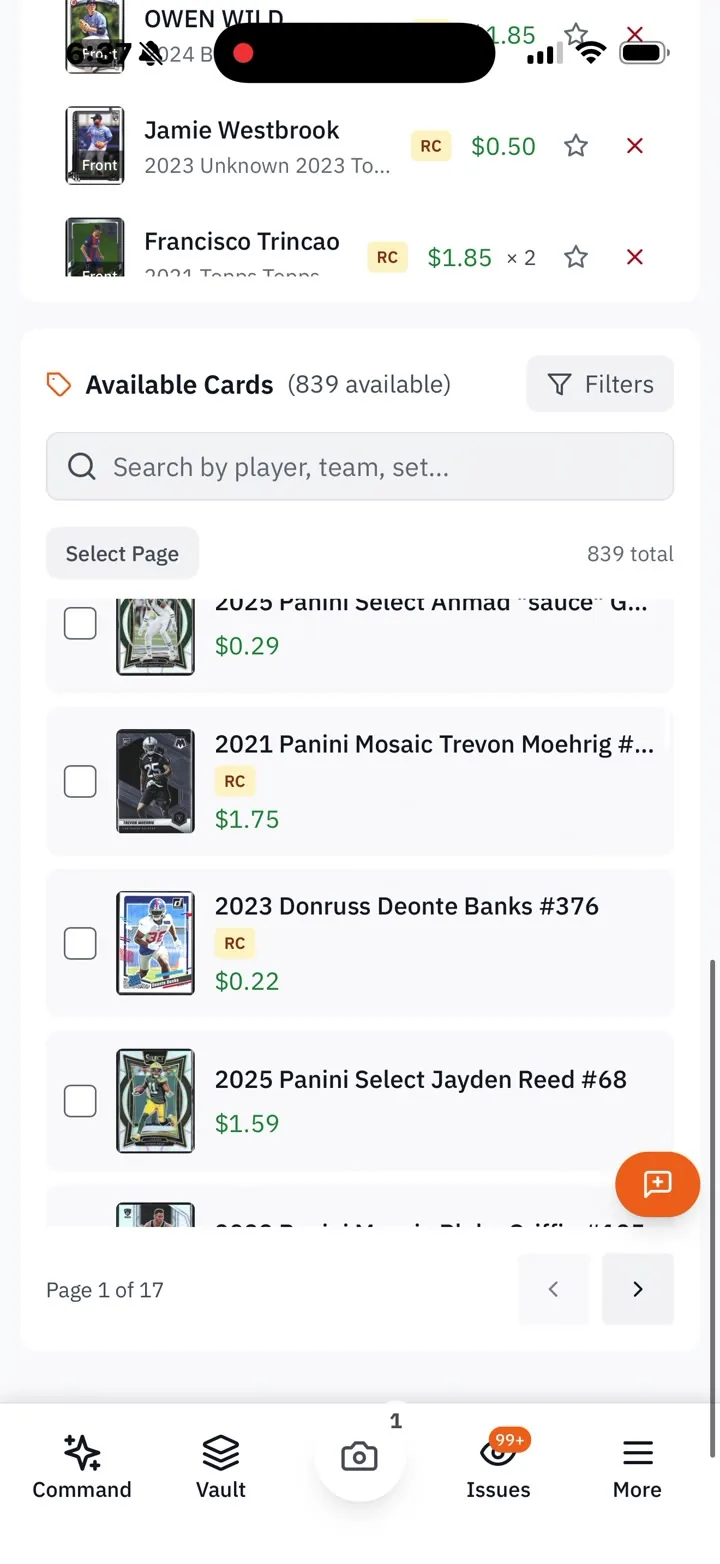
RocketVault mobile recording of selecting available cards for a Card Show pack list.
PACK LIST ON MOBILE
Pull available cards into the show workflow while you are on the floor.
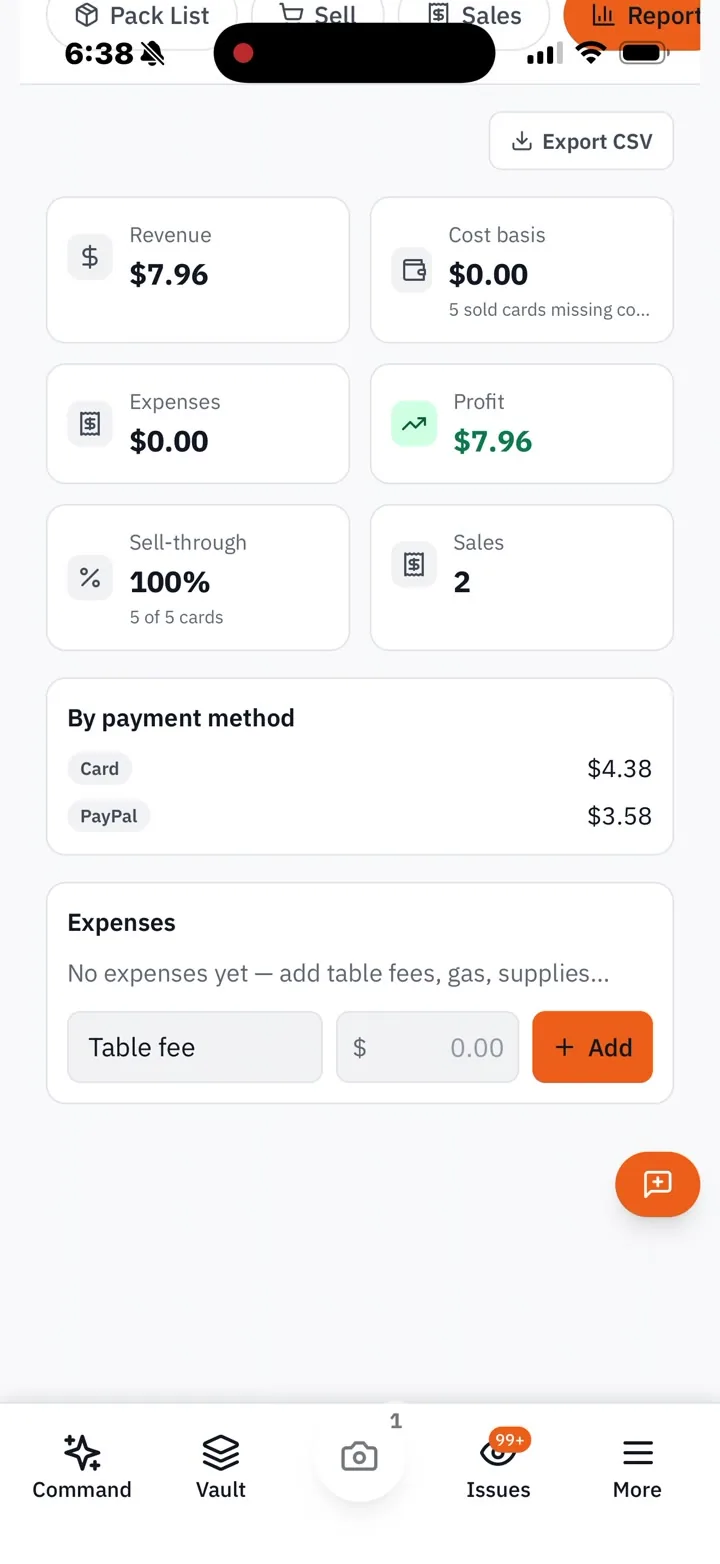
RocketVault mobile recording of a Card Show report with revenue, expenses, profit, sell-through, and payment methods.
SHOW REPORT
See sales, expenses, profit, and sell-through before you pack up.
SEE EVERYTHING INCLUDED

Scan for a Deal identifies a card, checks ownership and tracked-set progress, prices it with confidence, calculates your max offer, and lets you add, buy, trade, watch, or pass. Table carts split one negotiated total into exact cent-based cost bases. Value-matched trade suggestions help build an editable side in person or online. Card Show Mode handles offline selling, QR labels, buyer wants, automatic delisting, and show P&L. The Trading Marketplace continues after the show.

WHY THIS IS DIFFERENT
Inventory apps assume you're online and selling online. None of them advertise a show floor that works with no signal, or ending your eBay listing by itself the moment the card sells at the table.
Scan for a DealEvery plan — max offer, tracked sets, batch capture, table carts, expiring Watch/share links, trade suggestions, and reconciliation
Card Show ModeEvery plan — shows, pack lists, sales, leads, and the show report
Works with no signalEverything saves on your phone and syncs itself later — never posts twice
QR price labelsPrint a label per card; scan it to pull the card up — your walk-away price stays private
No double-sellingA card sold at the table gets its live eBay listing ended automatically
Take any paymentCash, Venmo, PayPal, Zelle, Cash App, or card — multi-card deals with one total
Show reportRevenue, costs, table fees, profit, sell-through, and cash-in by payment method
Buyer want-listsJot “wants Jordan inserts — table 12” and it syncs into a leads list
Trading MarketplaceEvery plan — searchable inventory, value-matched card suggestions, counters, tracking, and reputation
Scan for a Deal and Card Show Mode are ungated. Free includes five initiated marketplace offers per month; paid plans include unlimited offers.
06 · GRADING ASSISTANT

Know which cards are worth grading — and what you'd make.

See the condition evidence and the after-fee grade economics together, so a strong-looking card still has to earn its grading cost.
SEE EVERYTHING INCLUDED

RocketVault scores every card on centering, corners, edges, and surface, then does the math: what you'd make raw vs. PSA 9 vs. PSA 10 after grading fees and shipping. Check a whole stack at once and see which cards earn back the grading cost — and which don't. Your morning report flags grading candidates on its own, and you can ask the agent to rank them by what you'd make after fees.

WHY THIS IS DIFFERENT
Card Dealer Pro doesn't touch grading at all.
AI scoresCentering, corners, edges, surface — per card
What you'd makeAfter grading fees, for raw, PSA 9, and PSA 10
Fee schedulesPSA, SGC, BGS, and CGC built in
Check a whole stackRun a stack at once and rank by what you'd gain
AvailabilitySeller plan and up
07 · REAL P&L · EBAY FINANCES

Your real profit, pulled from eBay — not just the sale price.

Track active inventory and card-level economics against real eBay fees, ad spend, shipping, and cost basis—not a flattering gross-sales number.
SEE EVERYTHING INCLUDED

When a card sells, RocketVault pulls the real numbers straight from eBay: what the buyer paid, any ad spend on the sale, the eBay fees, and the shipping label you paid for. Every sale breaks down into five numbers ending in your real profit, with profit and margin against what you paid for the card. It lives on your home screen (last 7, 30, or 90 days, plus a per-card view) and on every card you sell — added up automatically as eBay posts the fees.

WHY THIS IS DIFFERENT
Most tools show the sale price and stop. Fees, ad spend, and shipping are where card profits actually go — and they only live in eBay's own numbers.
Five numbersMoney in · ad costs · eBay fees · shipping · what you kept
Per-cardEvery card you sell shows its own real numbers
Profit + marginAgainst what you paid for the card
Added up for youFills in as eBay posts the fees — pending sales flagged
AvailabilityAdvanced dashboard, paid plans
08 · GUIDED ACTIVATION

From sign-up to your first listing, on a checklist that checks itself.

A self-completing path moves a new account from first scan to organized vault and first live listing without an empty-dashboard scavenger hunt.
SEE EVERYTHING INCLUDED

New accounts get a simple checklist on your home screen: upload your first cards, clear the flags, connect eBay, post your first listing. Each step checks itself off as you do it — cards uploaded, flags cleared, eBay connected, a listing live — so it never nags you about something you've already done, and it goes away once you're up and running. With unlimited scanning and AI-written listings, it's the fastest path from photo to listed in the category.

WHY THIS IS DIFFERENT
Most card tools hand you an empty screen and a help link. RocketVault's first session follows what you've actually done, not a fixed tour.
ChecklistEvery plan — upload → check → connect eBay → first listing
Checks itself offSteps complete from what you've actually done, not a box you tick
Free trial14 days of the full app on every signup — no card, no code
09 · WISHLIST · TRADING

Keep the exact cards you want—and act when they show up.

Save the player, set, and parallel you are actually hunting, then follow marketplace opportunities from the same exact-card language you use in the vault.
SEE EVERYTHING INCLUDED

A wishlist is more useful when it is exact. Save the player, year, set, and parallel you care about, see the known price when it is available, and jump directly into relevant buying opportunities. The Trading Marketplace adds another route to the same goal: browse cards other collectors have made available, see what kind of offer they will accept, and build an offer with values visible before you send it.

Precise targetsSave the player, set, parallel, and card number you actually want
Pricing contextSee the available market estimate before you decide to buy
Marketplace discoveryBrowse cards offered for trade or cash by other RocketVault collectors
Offers with contextBuild the offer with the card and value details visible first
AvailabilityWishlist on every plan; Free includes five initiated marketplace offers per month
10 · ECONOMICS · PRICING · LOT RULES

Set the math once. Keep every buy, price, and bundle inside it.

Your own costs, price floors, refresh behavior, and lot rules turn the settings page into a guardrail—not a collection of guesses.
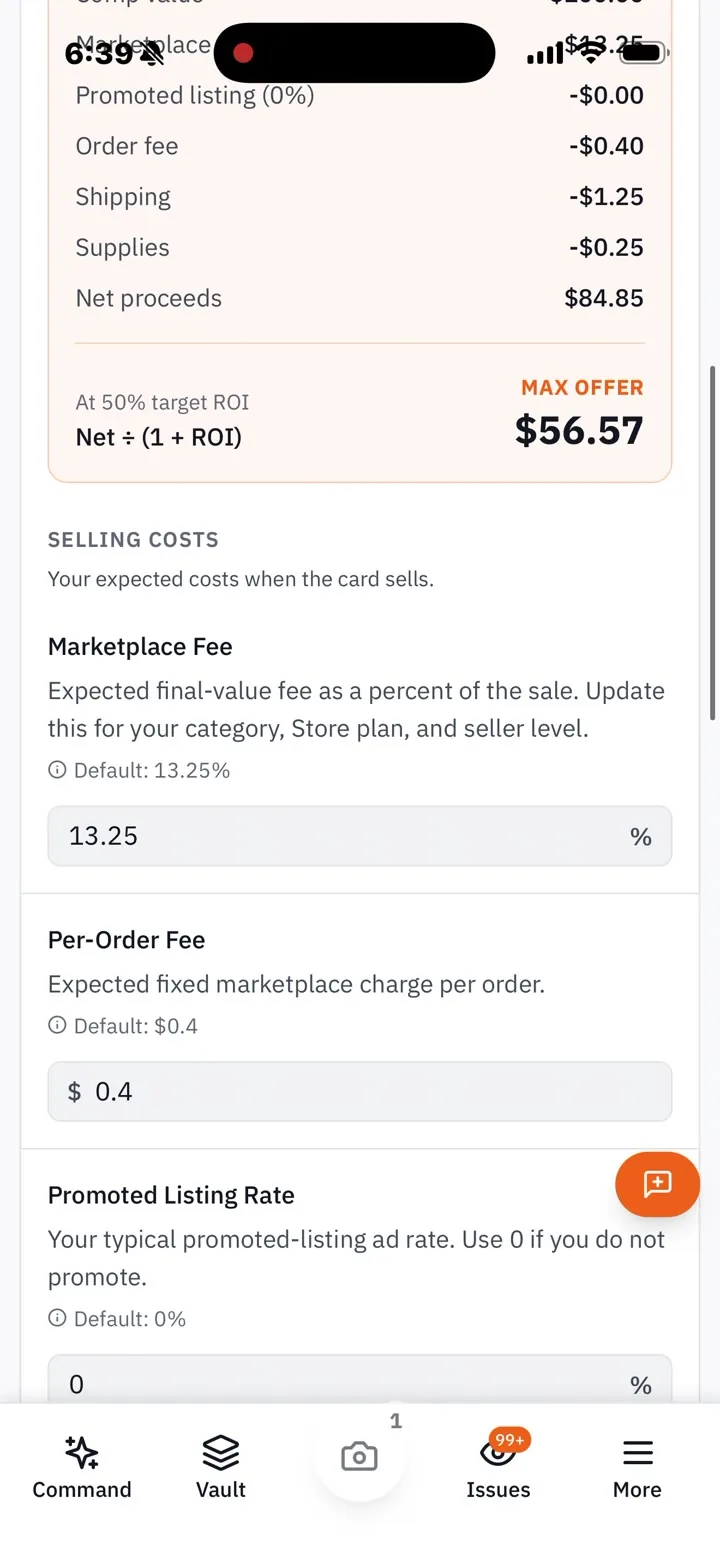
RocketVault mobile recording of Buying Economics showing net proceeds, a maximum offer, marketplace fees, shipping, and supplies.
BUYING ECONOMICS
Watch a comp become a max offer after your costs and target return.
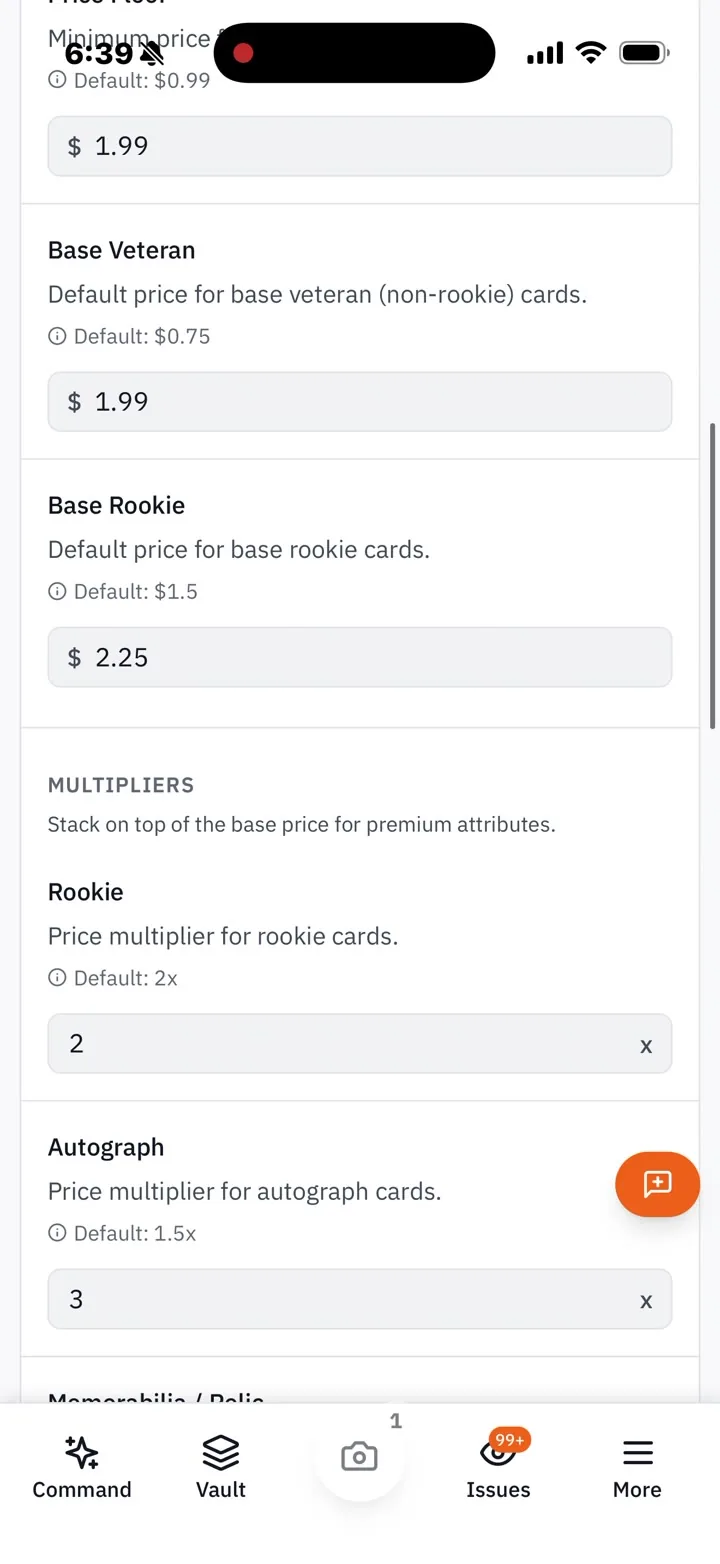
RocketVault mobile recording of pricing rules for minimum prices and multipliers for rookie and autograph cards.
PRICING RULES
Set your floors and multipliers before a listing needs attention.
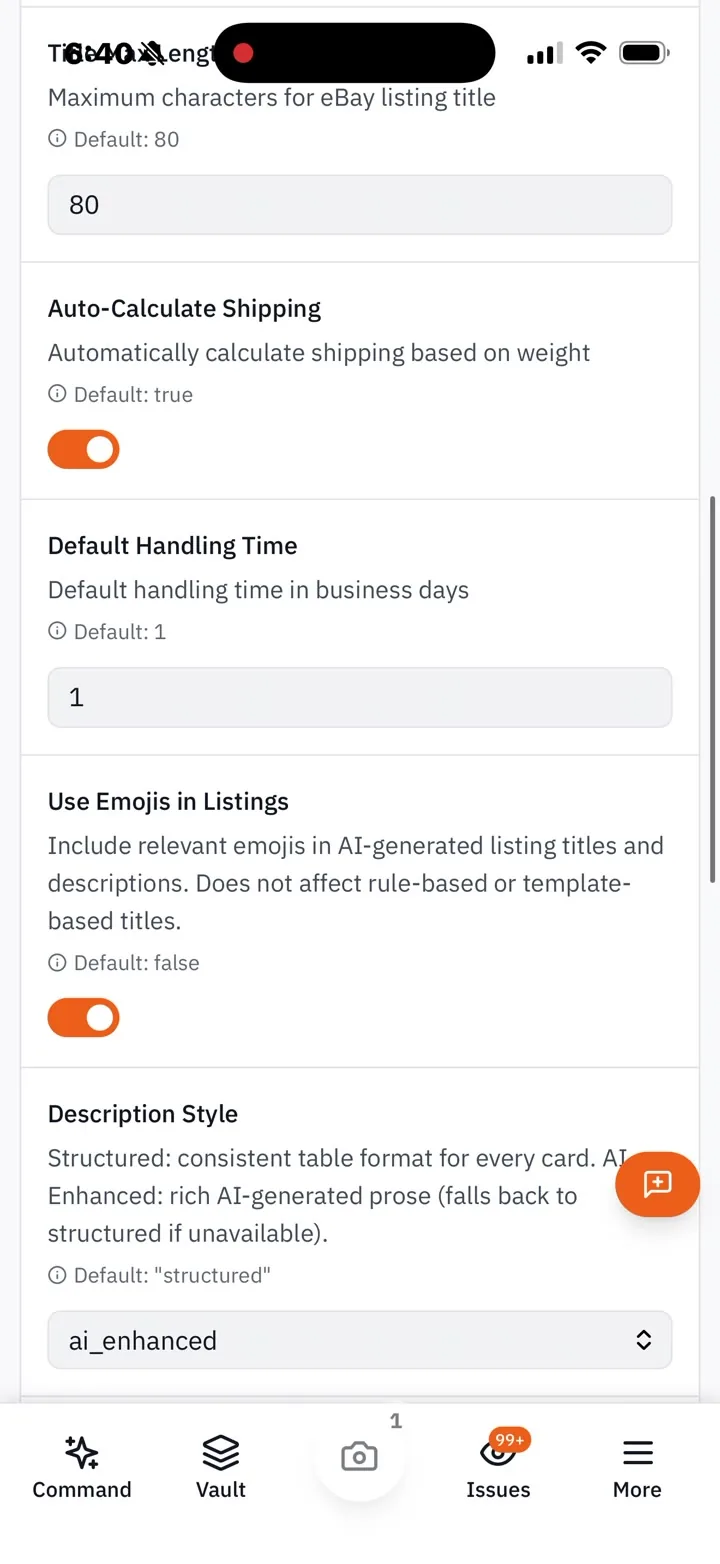
RocketVault mobile recording of eBay listing settings for duration, title length, shipping, handling time, and description style.
LISTING SETTINGS
Set the shipping, handling, title, and description defaults once.
SEE EVERYTHING INCLUDED

A comp is not an offer price, and a sale price is not profit. RocketVault shows how a comparable value becomes a max offer after marketplace fees, supplies, shipping, and your target return. Set a price floor and the rule for refreshing stale listings before they need attention. For bundles, choose the minimum cards, target discount, minimum value, and automatic naming behavior up front—so lot suggestions match how you actually sell.

Maximum offerComparable value less marketplace fees, order costs, shipping, supplies, and your target return
Refresh rulesSet soft and hard price reductions while enforcing a listing floor
Price defaultsSet the fallback prices for base veterans and rookies when live data is unavailable
Lot guardrailsMinimum cards, maximum cards, minimum value, default discount, and automatic names
Why it mattersEvery automated recommendation stays inside the rules you chose
July 2026
Trading Marketplace

Publish trade inventory, match structured wants, negotiate card or cash offers, and track handshake shipping.

June 2026
Agent does the work

Build bundles, post to eBay, edit listings, and drop prices from chat — you approve every step.

June 2026
Daily report

A morning read on your cards — news, prices, and grading, with clickable sources.

See it run your collection.
Every new sign-up gets 14 days of Seller — no credit card, no code. Upload your first batch, publish to eBay, and wake up to a Daily Brief. After that, the Free plan (100 cards) is yours to keep for good.
Start free →
EXPLORE · NEXT
COOKIES · ANALYTICS

We use cookies for product analytics and session replay to understand how RocketVault is used and where we can make it better. No advertising cookies unless you accept. Privacy policy.