Selling on RocketVault Marketplace
List cards from your Vault, choose how you ship, see what you will earn, and keep eBay listings in sync.
Browse all active cards now. Buying is temporarily delayed while we finish our final checks. We will announce when checkout is ready.
A marketplace built around the cards already in your Vault
RocketVault Marketplace lets you turn a card in My Vault into a listing without entering its name, set, grade, photos, and price all over again.
You can list on RocketVault Marketplace, eBay, or both. RocketVault Marketplace is the lower-fee choice. eBay remains available when you want its larger audience, and RocketVault keeps both listings tied to the same physical card.
RocketVault Marketplace is for U.S. buyers and U.S. sellers only. All prices and payments are in U.S. dollars.
A head start for every existing member
Visitors can browse without creating an account. When checkout is available, they can buy cards as guests; sellers still need a RocketVault account and completed seller setup. See Buying Cards on Marketplace.
Before then, existing RocketVault members will get time to set up as sellers and prepare their listings. Every RocketVault account created before October 1, 2026, at midnight Eastern is included—even if the account has fewer than 50 cards or no cards yet. Card count and recent activity do not decide who qualifies.
During this head start, members can:
- finish their seller and shipping setup;
- choose cards from the Vault and prepare RocketVault listings;
- review prices, shipping choices, and expected proceeds; and
- report anything that feels confusing or does not work as expected.
During the head start, buying, offers, and public browsing stayed closed. Preparing a listing by itself did not open checkout.
No RocketVault seller fee for the first 30 days
Existing members will pay 0% in RocketVault seller fees on Marketplace orders placed during the shared 30-day launch offer. This includes every existing member, not only large or active collections.
The sale date decides whether the offer applies:
- A card listed before launch and sold during the first 30 days has no RocketVault seller fee.
- A card sold after the 30-day offer ends uses the standard Marketplace fee, even if it was listed during the offer.
- Shipping, sales tax, and any eBay fees remain separate.
Guest checkout, order recovery, and buyer support are required for opening day. Shipping and seller payout continue through the order lifecycle after payment.
List on RocketVault, eBay, or both
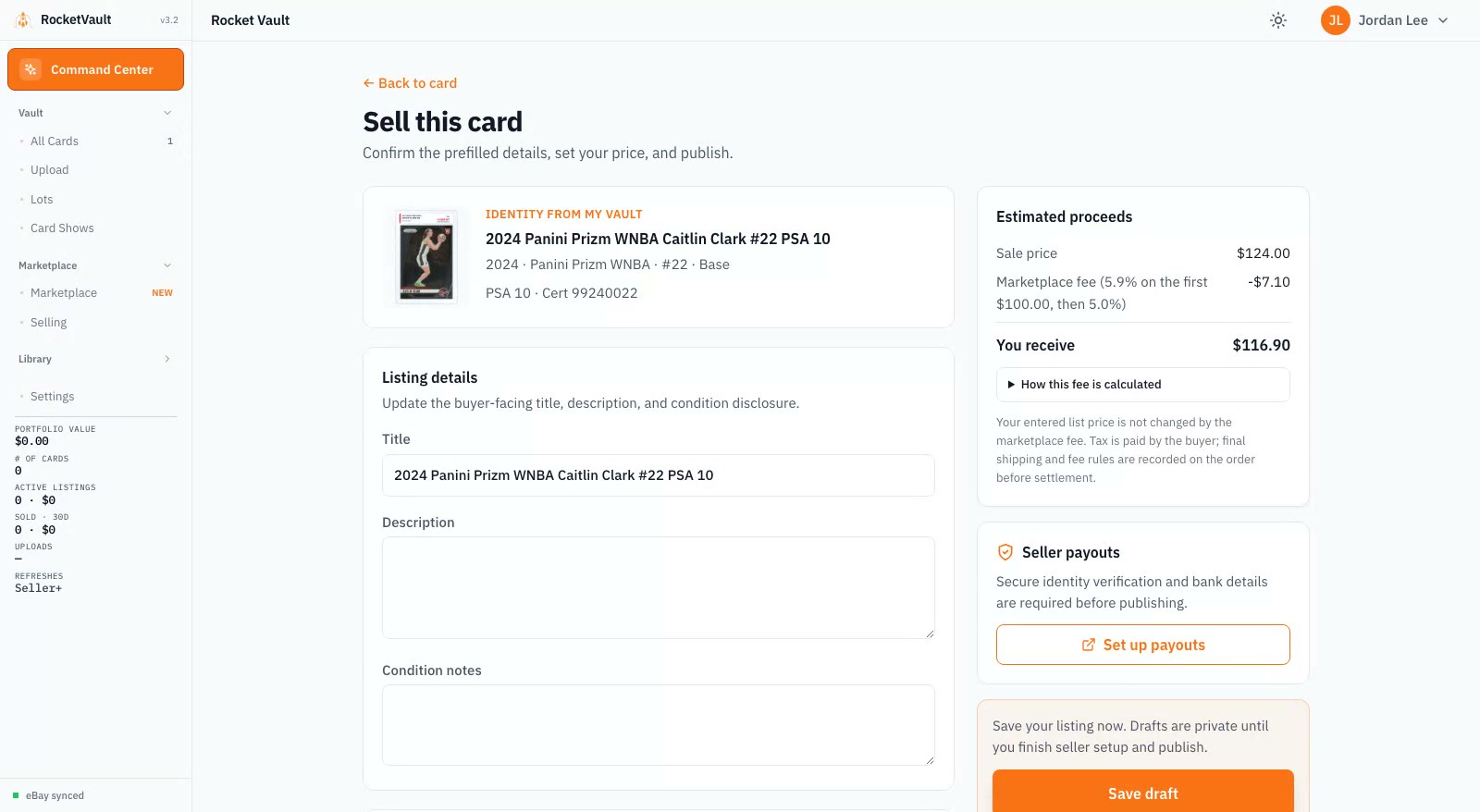
Start with any card in My Vault:
- Open a card and choose List card, or select several cards and choose List cards.
- Pick RocketVault Marketplace, eBay, or RocketVault Marketplace + eBay.
- Review the card photos, title, condition, price, offers, and shipping choice.
- Check the amount labeled You receive.
- Publish the cards that are ready. RocketVault keeps anything that needs work in the review list and tells you what to fix.
Cards marked Needs Review, Ready for Listing, or Ready — High Value can all enter the listing review. RocketVault still checks that you own the card, it has not sold, the listing has a usable photo and price, and your seller setup is complete before it publishes.
For a large selection, Bulk List keeps your saved card prices and asks for a fallback price only when a card has no price. You see exactly which cards are ready and which need attention before anything goes live. Your saved minimum price from Settings applies to RocketVault Marketplace too, so a new listing or price change will not slip below the amount you chose.
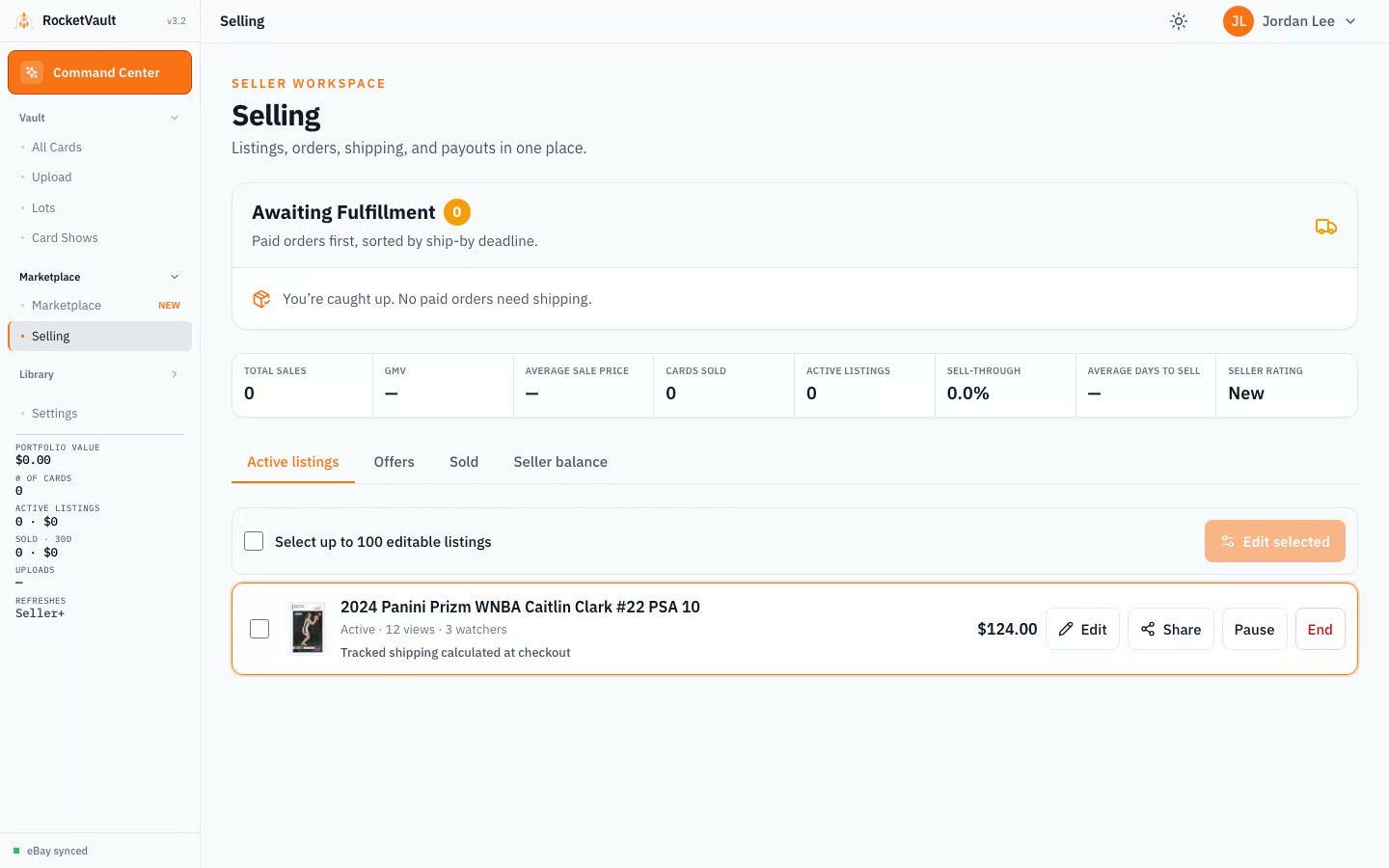
After publishing, open Selling to change several RocketVault listings at once. Select the listings, choose Edit selected, and update prices, offer settings, who pays for shipping, delivery choice, package, or condition notes. Live eBay listings continue to use eBay's editing flow.
Use the search and filters at the top of Selling to find a player, set, team, card number, listing status, shipping choice, or price range. Below my minimum gathers older low-priced listings in one place so you can select and fix them together. Sort by price, title, or last update, then show 25, 50, 100, or 200 listings at a time and move between pages. You can update up to 100 editable listings on the current page in one change.
Why start with RocketVault Marketplace?
- Free listings. Create as many RocketVault Marketplace listings as you need.
- Lower seller fees. The standard fee is 5.9% on the first $100 of an order and 5.0% on the amount above $100. Payment processing is included.
- No rebuilding listings. Your card record, photos, price information, and condition move into the listing with you.
- Clear proceeds. You see the fee, estimated shipping cost, and what you receive before publishing.
- One place to work. Listings, offers, sold cards, shipping, and payouts are together under Selling.
RocketVault charges $0 for eBay publishing. If a card sells on eBay, eBay's normal seller fees still apply.
Cross-list without losing track of the card
When you choose RocketVault Marketplace + eBay, RocketVault creates both listings from the same Vault card. If that card sells in one place, RocketVault starts removing the other listing so a second buyer cannot purchase the same card.
If one destination needs attention, RocketVault shows what happened and lets you retry only the unfinished listing. It does not knowingly create the same eBay listing twice.
Draft first, finish setup when you publish
You can create and save a private Marketplace draft right away. Choose a card from your Vault, review the title, set your price, and tap Save draft. Payout and shipping setup can wait. Drafts do not appear to shoppers and cannot be purchased until you publish them.
When you are ready to publish, there are two required setup steps:
- Verify payouts. Confirm your identity and the bank account that should receive payouts. RocketVault returns you to the place you started.
- Confirm your ship-from address. RocketVault uses this private address and shipping contact information to calculate postage and create labels.
RocketVault prepares buyer-paid calculated shipping and a recommended card package for new sellers automatically. Existing saved shipping choices are kept. Optional shipping settings let you customize how you send cards or who pays; you do not need to choose these settings before saving a draft.
You do not need a business name, business website, or separate shipping account to sell as an individual. Required identity, bank, and tax verification still apply before publishing. Publishing also waits for Marketplace readiness.
Shipping that fits the card
RocketVault offers simple package choices for raw cards, graded cards, and multi-card orders. Choose Best available when you want RocketVault to use an economical card envelope when the order fits and tracked parcel shipping when it does not. Choose Always tracked when every order should use a tracked package.
Low-value, flexible raw-card orders may qualify for RocketVault Card Envelope postage: $0.82 at 1 oz, $1.11 at 2 oz, or $1.40 at 3 oz. Graded cards, rigid packages, high-value cards, heavy orders, and cards that do not fit the envelope rules use tracked parcel shipping instead.
Changing the account default does not silently rewrite listings you already published. If an older listing still shows tracked parcel shipping, select it on Selling, choose Edit selected, and apply Best available again.
Cards from the same seller can share one package when they fit safely. The buyer sees the combined-shipping savings, and the seller sees the actual label cost before fulfillment.
Prices, offers, and what you receive
RocketVault keeps these amounts separate so there is no surprise at the end:
- the card's asking price;
- any discount or accepted offer;
- shipping paid by the buyer or seller;
- sales tax paid by the buyer;
- the RocketVault seller fee; and
- the amount the seller receives.
You set the asking price. RocketVault Pricing and recent comparable sales are there to help, not to force a number. You can allow offers and set the lowest offer you are willing to accept.
Learn more in Marketplace Fees & What You Keep.
What happens after a sale
The Selling page puts orders that need shipping first. Each order shows the card, buyer name, buyer city and state, ship-by date, shipping service, paid total, and the next action.
After payment:
- Pack the card using the package shown on the order.
- Buy and print the RocketVault shipping label.
- Hand the package to the carrier by the displayed date.
- Follow delivery in the same order timeline.
- Receive your payout after delivery and the buyer-protection period are complete.
Tracking updates follow carrier reports. Buying a label alone does not mark an order mailed or delivered. If the order timeline stops updating, contact support from the order page before purchasing another label.
A successful payment does not make proceeds immediately available. Delivery, refunds, disputes, and buyer-protection issues must be settled first. The Selling page always shows whether money is pending, available, or already paid.
Buying and making offers
Buyers can search by player, year, set, grade, and price. Marketplace results can show 25, 50, 100, or 200 cards at a time, with simple page controls to keep browsing. The result count covers all matching active cards across every seller; it is not capped at 999. Select Other sellers to leave out your own listings and see the exact count from other members. Each card shows the seller name; open a card and select View seller’s cards to browse that seller’s live cards inside the app. A listing also shows the seller's actual card photos, condition, price, shipping terms, and rating. Members could browse before public buying opened; an empty Other sellers view means no other member has a matching live card yet.
For signed-in buyers, RocketVault saves the delivery address used at checkout. The next purchase starts with that address already filled in, and the buyer can choose Edit to use a different address. The most recently used saved address becomes the default for the next order.
When an eligible RocketVault-funded buyer credit is active, checkout shows the discount and final amount before payment. The seller's agreed proceeds do not change.
Signed-in buyers can suggest a price when offers are allowed. The seller can accept, decline, or counter. Accepted offers reserve the card for checkout for a limited time. Guest checkout is for fixed-price purchases.
Buyer protection, refunds, and ratings
Every paid order has one timeline shared by the buyer and seller. It follows payment, shipping, delivery, any reported issue, refund, and payout.
For signed-in buyers, if the full payment is refunded before the seller ships, the card leaves the buyer's Incoming list automatically. RocketVault keeps a Purchase refunded record with the order history, but it cannot be marked received or listed for sale. A partial refund does not remove a card that is still expected to arrive.
If a buyer reports a qualifying problem, the seller's payout pauses while the issue is reviewed. Buyers can rate the seller after delivery, and sellers can post one public response. Read Marketplace Buyer Protection for the complete policy.
Share a listing
Sharing tools have separate availability from browsing and checkout. When available on an active listing, choose Share to prepare an image, caption, and link for Facebook, Instagram, or TikTok.
RocketVault opens the sharing tools, but you review and publish the post yourself. It never tells you a post was published unless the social app confirms it.
Common questions
Do I need eBay to sell on RocketVault Marketplace?
No. eBay is optional. Choose RocketVault Marketplace by itself, eBay by itself, or both.
Can I buy from Marketplace without an account?
Yes, when checkout is available. Browse freely, then use guest checkout. You need an account only to collect the purchase in your Vault, make an offer, or sell.
Does every existing member get the 0% launch offer?
Yes. Every RocketVault account created before October 1, 2026, at midnight Eastern qualifies, including accounts with fewer than 50 cards or no cards yet.
Does the 0% offer include shipping or tax?
No. It removes the RocketVault seller fee. Shipping and sales tax remain separate.
Can the same card be listed on RocketVault and eBay?
Yes. Choose both destinations. RocketVault links the listings and starts removing the other one when the card sells.
Can international buyers or sellers use Marketplace?
Not yet. RocketVault Marketplace currently supports U.S. buyers, U.S. sellers, U.S. shipping addresses, and U.S. dollars only.
New member launch offer
Anyone can browse publicly; the storefront shows guest checkout availability. New members could list during the early listing period. Accounts created before midnight Eastern on October 1 qualify for 0% RocketVault Marketplace selling fees for the first 30 days from public launch. The offer starts at launch, not signup; existing members keep their launch offer. U.S. buyers and sellers only, using USD. Shipping, tax, and eBay fees are separate. See the launch offer details.
Getting Started for Sellers
A step-by-step guide for sellers — scan, price, list, and manage your card business with RocketVault or eBay.
Marketplace Fees & What You Keep
A plain-English guide to RocketVault Marketplace fees, launch savings, shipping, tax, and eBay costs.
Listing Cards on eBay
Connect your eBay account and publish listings directly from RocketVault with AI-generated titles and descriptions.
Marketplace Buyer Protection
How order tracking, item-specific claims, evidence, payout holds, refunds, and seller trust work in RocketVault Marketplace.