Card Catalog
Browse and search the RocketVault Card Database — millions of cards across thousands of sets from all major sports and manufacturers.
Overview
The RocketVault Card Catalog brings together millions of sports cards across thousands of sets from the major manufacturers. Use it to explore a set, find a specific card, check available pricing, or save a card to your Wishlist or Collection.
The catalog is included for every account.
Where Catalog lives in the app
Open Research in the sidebar. From there, you can:
- choose Browse Sets to explore by sport, year, and brand;
- choose Search Cards to look for a player, set, or card number; or
- open any set to see its checklist, parallels, and available prices.
Browsing sets
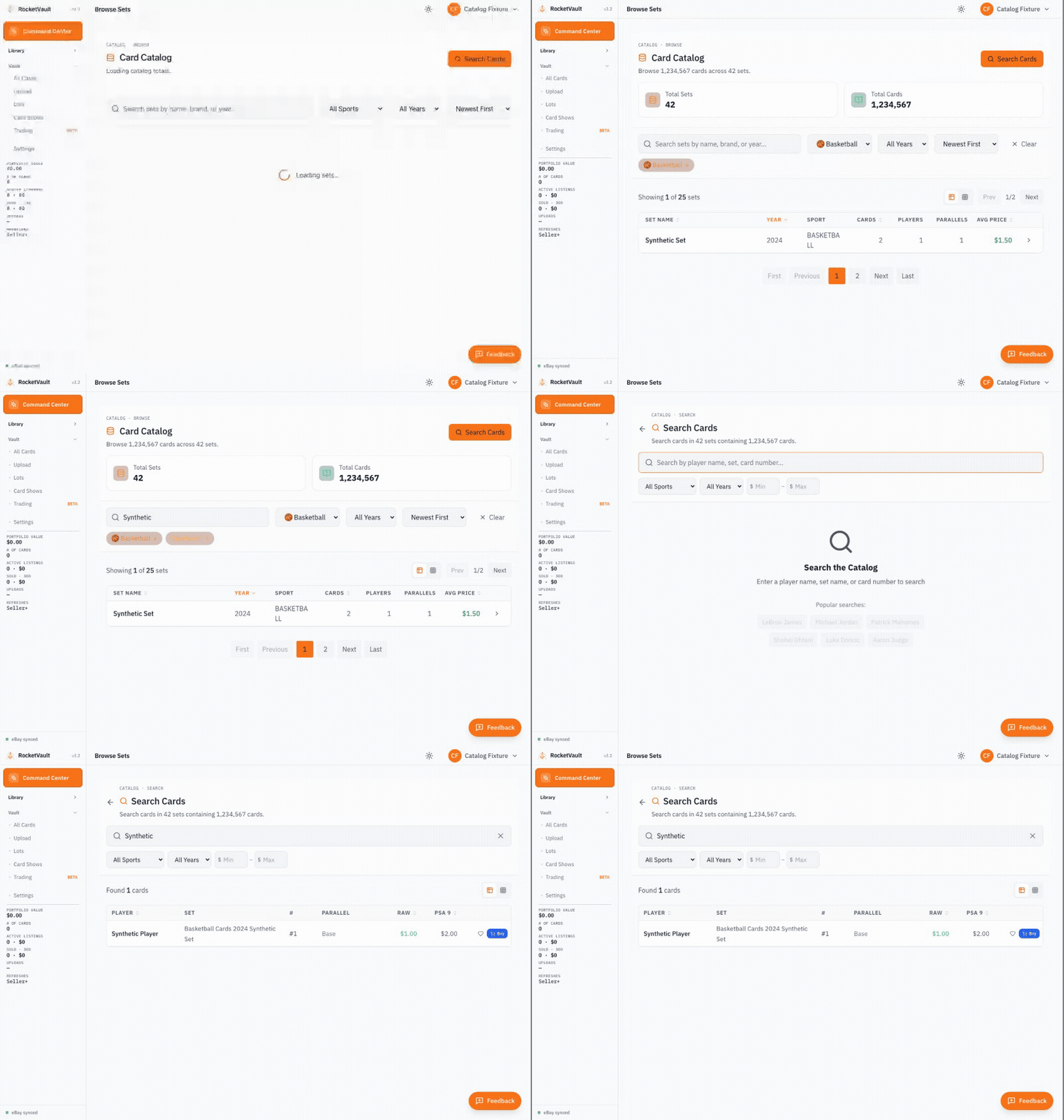
The header and two totals cards show named sets and cards from the latest daily catalog refresh. Cards without a set name are excluded from these totals. Search Cards uses the same overview; individual search results can still include other catalog cards. Totals do not change when you filter or move between pages.
While totals load, the page says Loading catalog totals. If they are temporarily unavailable, use Retry totals; you can continue browsing and searching.
Step 01
Open the Catalog
Click Research → Browse Sets in the sidebar.
Step 02
Filter by sport, year, and search
Use the toolbar to narrow by sport (Baseball, Basketball, Football, Hockey, Soccer, MMA/UFC), by year, or by typing a brand or set name into the search bar.
Step 03
Sort however you want
Sort by Newest, Oldest, Highest Value, Lowest Value, Most Cards, Fewest Cards, or alphabetical. On the table view, click any sortable column header to toggle direction.
Step 04
Switch between table and grid
Desktop has a table/grid view toggle in the results header. Mobile is locked to grid view (tables are unreadable on small screens).
Click any set tile or row to open its full checklist.
Searching for cards
Search Cards looks across individual cards, not just set names. Use it when you know the player or card number but are not sure which set to open.
You can search by:
- Player name — "Mike Trout", "LeBron James"
- Set name — "2024 Topps Chrome", "Prizm Silver"
- Card number — "#150", "RC-1"
- Combined queries — "2024 Topps Chrome Mike Trout"
Filters: Sport, Year, and Min/Max price. Sort by Player, Year, Raw price, or PSA 9 price by clicking column headers.
The empty state suggests popular searches (LeBron James, Michael Jordan, Patrick Mahomes, Shohei Ohtani, Luka Doncic, Aaron Judge) so you can poke around without typing anything.
Set detail page
Click any set to open its checklist. You'll see:
- Set stats — total cards, players, parallels in the set
- Owned vs. wishlist counts — how much of the set you've already got, and how much you want
- Parallel filter — narrow the checklist to a specific parallel (Refractor, Gold, Black, etc.)
- Search within set — find a specific player or card number in the checklist
- Per-card actions — Buy on eBay (affiliate-aware deep link), Add to Collection (folder icon), Add to Wishlist (heart icon)
Rookies are flagged with an RC badge. Cards you already own get a green folder icon; cards already on your wishlist get a pink heart.
Adding cards to your inventory or wishlist
Every card row on Search and Set Detail has two action buttons:
- Add to Collection (folder icon) — opens a modal letting you pick which collection to add the card to. This adds the catalog card to your owned inventory under Vault → Collection.
- Add to Wishlist (heart icon) — saves the card to your Wishlist with current pricing data. The heart fills in pink once it's saved.
You can also click Buy on any row to open eBay with a pre-built search query (year + player + set + card number + parallel) so you can hunt the card down right away.
See the Wishlist guide for what to do with a wishlist once you've built one.
How the catalog powers RocketVault
The catalog is the backbone of several features:
- AI Identification — When RocketAI scans your card photos, it matches against the catalog to identify the exact card (and the exact parallel)
- Pricing — Market values are tied to catalog entries via the RocketVault Pricing Database
- Wishlist — Every wishlist entry is a pointer into the catalog so prices stay live
- Set completion — Set Detail tracks how much of a set you own vs. still want
- Variant detection — The catalog knows all parallels and variants for accurate identification
Common Questions
How often is the catalog updated? The catalog is updated regularly as new sets are released. Major releases (Topps, Panini, Upper Deck) are typically added within days of release.
Can I request a missing card or set? Yes — contact us with the set details and we'll prioritize adding it.
Does the catalog include non-sports cards? Currently, RocketVault focuses on sports cards (baseball, basketball, football, hockey, soccer, MMA/UFC). Trading card games and non-sports cards are on the roadmap.
Getting Started with RocketVault
Set up your account, explore the dashboard, and learn the basics of the RocketVault sports card platform.
AI Card Identification
How RocketAI automatically identifies your cards, extracts metadata, and detects parallels and variants.
Viewing Pricing Insights
See your portfolio value, per-card prices, and price history.
Wishlist
Track cards you want to acquire. Bookmark cards from the catalog and click straight through to eBay with a pre-built search query.