Buying Cards on RocketVault Marketplace
Browse without signing in, see the final total, check out as a guest, and manage your purchase.
Public buying is open. U.S. buyers and sellers can use RocketVault Marketplace now.
Shop first
Start at rocketvault.io and choose Buy cards. Choose Sell cards when you want to identify and organize your own cards. Use Under $20 to find cards priced up to $19.99 before shipping and tax. See Finding Your Next Card for filters and daily discovery stories when they are available.
Visit rocketvault.io/marketplace to browse live card listings and seller pages. You do not need a RocketVault account to search, filter, compare cards, or read listing details. The marketplace shows whether checkout is available. Buying supports U.S. buyers and U.S. sellers, in U.S. dollars.
Your browser can reuse unchanged card photos when you revisit a listing.
Desktop browsing shows six cards across. The public marketplace and Browse cards use the same compact layout, with a card photo, name, grade, price, and shipping. Open a listing to see the seller's name, full description, condition notes, seller history and offer options. When signed in, look just below the photos for the asking price, grade, shipping and buying options. On a phone, use the magnifier to see a larger photo.
When checkout is available, you can buy as a guest and decide later whether to add the purchase to a RocketVault account. Seller payout and ship-from setup do not apply to buyers.
Select Buy now on a card or add cards to your cart. Cards from one seller can share one checkout and shipment. Cards from different sellers have separate payments and shipments.
Add to cart reserves a card for 30 minutes. The cart shows the countdown. Going back, reopening the cart, or starting payment keeps the original deadline. Remove a card to release its reservation; expired cart holds become available to other buyers. If a secure checkout already exists, choose Continue checkout in the cart to reopen that payment.
Very small carts may need another card from the same seller before checkout. RocketVault shows this when calculating your total, before you pay. Adding cards from another seller starts a separate shipment and does not increase this cart.
On the card page, enter your ZIP code for a shipping estimate. At checkout, enter your full address and choose among all eligible services returned for that package and destination. Final total includes the shipping charge and tax before you continue to payment, with any discounts applied. If the total expires or your address changes, calculate shipping again.
Your shipping choice determines tracking and delivery timing. Card Envelope uses limited tracking. A tracked mailer shows carrier delivery scans. See Marketplace Buyer Protection for the corresponding review windows.
Choose copies or buy a whole lot
Quantity listings show the available copies. Select how many you want before adding them to your cart; totals and shipping use that quantity. A grouped lot is purchased together as one payable line with all its physical cards.
If a card is also listed on eBay, RocketVault checks that your copies are still available before you can pay. Your checkout may pause while we check.
Shipping considers every physical card, its grade and value, and the package's weight and dimensions. A larger lot does not inherit single-card envelope assumptions. Every purchased physical card appears in your buyer Vault. Lot acquisition cost is divided across the cards, with all cents reconciling to the order's original total. Historical order totals stay unchanged.
In Purchases, open an order to see how many cards you bought and what you paid. Open any linked card in your Vault, then choose Back to order to return to your receipt.
Check out as a guest
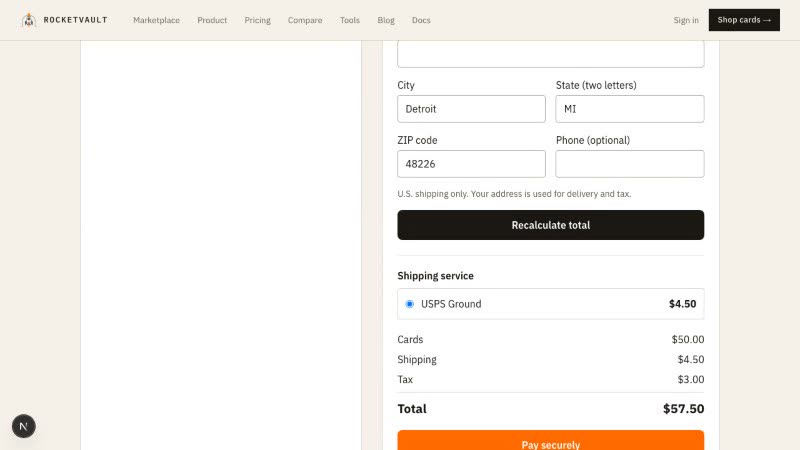
Enter your receipt email and U.S. delivery address. RocketVault calculates shipping and tax, then shows the final total before Pay securely sends you to Stripe Checkout. Your listing price, seller, shipping rate, and tax are checked again at payment time. A card that sells or changes price requires a fresh total. A RocketVault account and subscription are not required to buy.
After payment, RocketVault opens your order. If payment is taking longer or your connection drops, choose Check payment status. RocketVault looks up that checkout and opens the matching order when it finds one. If no order was started and the total has expired, the cart lets you calculate a new total. Keep your receipt email for order updates and shipping notices.
Reopen your purchase
Your order number alone does not open the order. If the browser session expires, open the purchase link and enter the email used at checkout. RocketVault sends a single-use recovery link only when the order and email match. The link opens your private order page for tracking, receipt confirmation, and buyer support.
If your purchase page can’t load the order, choose Try again on that page. Use Email a link when RocketVault asks you to reopen your order.
Open Tracking and delivery on the order for the latest status and any tracking number. Choose Help with this order to see the help available for that purchase. When the delivery window opens, choose Get help with this order to start a case. See Marketplace Buyer Protection for claim windows and outcomes.
Seller returns and refunds
When a seller has a published voluntary-return policy, Returns & refunds appears on that seller's card pages and storefront. Read the linked terms before buying; they apply only to that seller. To request a voluntary return under a published policy, contact RocketVault Support with your order number. Buyer Protection for eligible order issues is separate from voluntary returns.
Add the card to your Vault later
On a paid guest order, choose Add purchase to my Vault. Sign in or create a RocketVault account with the same email used at checkout and verify that email. If you reset your password, return to the same tab and sign in to finish adding the purchase. RocketVault then moves the purchased card and order history into that account. You can keep shopping as a guest; creating an account is optional unless you want collection or selling tools.
Read a card and keep your place
Choose a sport beside search, then narrow by player, set, grade or price. Results show the asking price, separate from any estimated value. Open a card and use Back to results to keep your search, filters and page. The link also appears if the listing becomes unavailable while you browse.
Ungraded means the card has not been professionally graded. It does not describe wear or damage. Review the seller’s condition notes and both photos. If condition notes are missing, the listing says so.
Listings that accept offers include Make an offer. Sign in to open that card’s offer form; no offer is sent until you confirm it.
Shipping paid by the seller appears as Free shipping. The checkout quote shows the service, tracking level and delivery estimate when available. Limited tracking has fewer scans; a delivery estimate is not a guarantee.
Marketplace Buyer Protection
How order tracking, item-specific claims, evidence, payout holds, refunds, and seller trust work in RocketVault Marketplace.
Selling on RocketVault Marketplace
List cards from your Vault, choose how you ship, see what you will earn, and keep eBay listings in sync.
Marketplace Fees & What You Keep
A plain-English guide to RocketVault Marketplace fees, launch savings, shipping, tax, and eBay costs.