Shop Coupons
Create a discount code for your shop, and see your savings before you pay.
Give buyers a reason to visit your shop
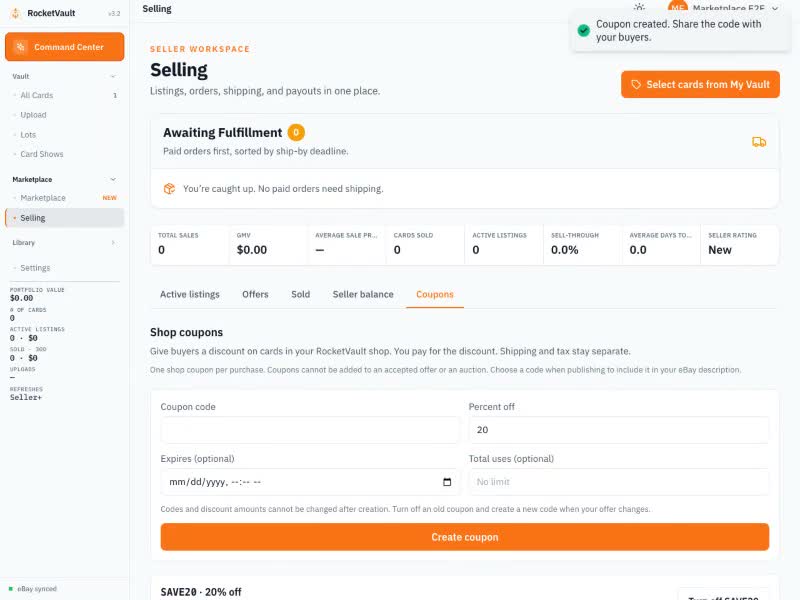
When Coupons appears in Selling, you can create a code for cards in your RocketVault shop. Pick a whole percentage from 1% to 99%, then share the code with your buyers. You pay for this discount. Shipping and tax stay separate. Coupons do not change your RocketVault subscription.
- Open Selling → Coupons.
- Enter a code with 2 to 32 letters, numbers or hyphens, such as SAVE20.
- Choose the percentage off. Add an expiration date or a total use limit if you want one.
- Select Create coupon. Share the code and a link to your RocketVault shop or listing through your own website or social pages.
The same code works only in the shop that created it. You can create up to 100 codes. A code's discount and limits cannot be changed after you create it. Turn it off and create a new code when your offer changes.
Use a code before payment
Add cards from that seller to your cart. Enter the code next to your delivery address, then calculate shipping and tax. You can use a code when buying as a guest, too. You can see the card prices, coupon savings, shipping, tax and total before you continue to payment. Changing your code or the cards in your cart means checking the total again.
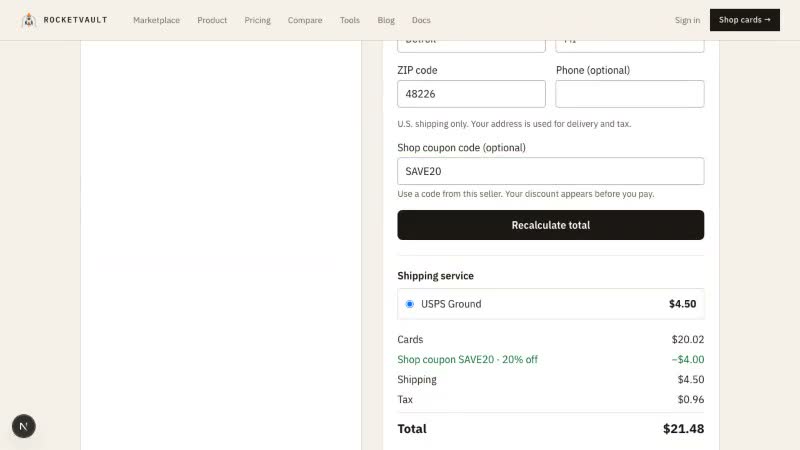
One shop coupon can be used per purchase. Coupons work on fixed-price cards and lots. They cannot be added to an accepted offer or an auction. A coupon reduces card prices. Shipping stays separate. Tax is calculated after the card discount. When you buy several copies, each card's discount is rounded to cents first. Very small purchases still need to cover the checkout minimum and the seller's fees and shipping costs.
A RocketVault-funded buyer credit may also appear. That is a separate offer paid by RocketVault, after your shop coupon. The checkout shows each saving and your final total.
Turn off a code or set a use limit
Select Turn off next to the code in Selling → Coupons to stop new purchases from using it. Buyers already checking out can finish at the price they saw.
The page shows how many purchases used the code and how many buyers are still checking out. Those unfinished purchases hold a use until payment succeeds or the payment service confirms they ended. A refund does not make a used code count available again.
Choose a coupon while publishing to eBay
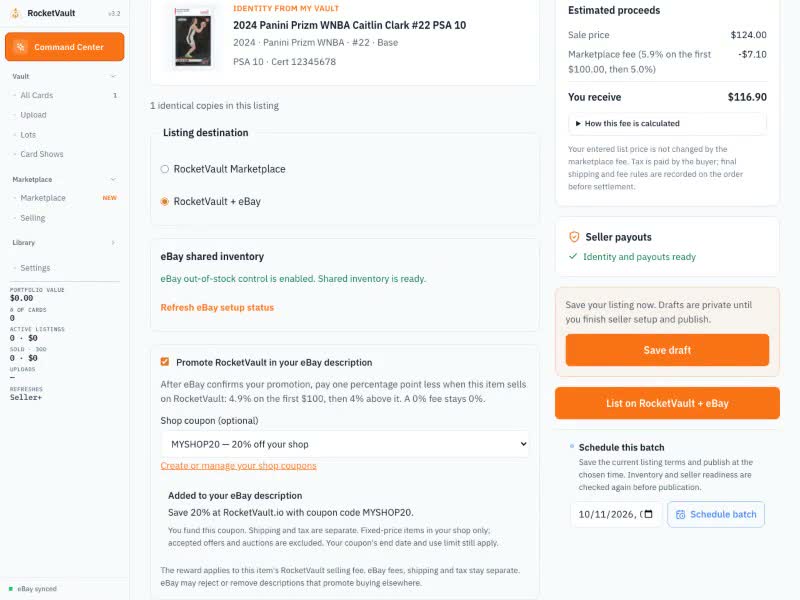
When Promote RocketVault appears in publishing, choose RocketVault + eBay. Select one of your active shop codes in Shop coupon (optional). The preview shows the code and percentage that will be added to your eBay description, for example:
Save 20% at RocketVault.io with coupon code SAVE20.
No link is added. Your RocketVault listing description stays the same, and no automatic coupon box appears on the listing. Your discount applies only in your shop. The description includes the offer's limits and end date when one is set.
You can also select Promote RocketVault without a coupon. The eBay description then says Listed with RocketVault. You pay nothing extra to select this option.
After eBay confirms the selected promotion, the RocketVault selling fee on that item is one percentage point lower: 4.9% on the first $100, then 4% above $100. Existing 0% offers stay at 0%. The reward applies to that promoted item; other items in the purchase keep their own fee. Shipping, tax and eBay fees stay separate. You fund any shop coupon used by the buyer.
A saved draft, scheduled listing or failed eBay publish does not activate the reward. Scheduled listings check the selected coupon again when they publish. An expired, disabled or fully used code cannot be selected for a new publication. Turning off a coupon does not edit your existing eBay descriptions. To change the promotion, remove and add that listing's eBay channel again.
eBay may reject or remove external buying promotions, even without a clickable link. Check eBay's policy before using a coupon invitation. The attribution option does not invite a buyer to complete an eBay purchase elsewhere.
Selling on RocketVault Marketplace
List cards from your Vault, choose how you ship, see what you will earn, and keep eBay listings in sync.
Marketplace Buyer Credits
How RocketVault-funded credits change a Marketplace checkout without reducing seller proceeds.
Marketplace Buyer Protection
How order tracking, item-specific claims, evidence, payout holds, refunds, and seller trust work in RocketVault Marketplace.